





 “Mom! What do we have today? Mom! What’s for dinner?! Awww, man, I have to get up early again tomorrow? Mom! We are out of Cheetos!”
Do these phrases and questions sound familiar? Not too long ago I was going a little crazy hearing my three kids (and occasionally my husband, too) on repeat, and I knew it was time to get serious about getting my family organized. I have three kids in various sports, lessons, and miscellaneous activities (much like everyone reading this), and I had tried all the dry-erase board calendars, papers hung on the fridge, and fun planners with lots of stickers to organize my week.


The problem with paper planners is that life happens, and things often get changed. Games and lessons get rescheduled, and dinner plans go out the window (my favorite time for this to happen is when the school fundraising nights at Chick-fil-A and Culvers pop up). So, then my OCD kicks in and my calendar needs fixing. Just me?! Not to mention the times when I don’t have my planner with me. Then I have to remember what I need to change, or use sticky notes, or text myself the changes I need to make, and nine times out of 10 those items never make it to the calendar until it’s too late.
READ: Dear Parent, From a Teacher: 3 Tips for Keeping the School Year Organized
Thus, I went on the hunt for a digital planner or calendar I could use on the fly, something I could rope my husband into using, something that could last a long time (at least until these kids are out of the house), and something that looked nice, too. My other qualification was that it has to be something my kids can walk up to and see. None of them have phones yet, so there isn’t any easy access to apps for them. I needed a calendar, a to-do list for each member of the family, a grocery list, a chore list, meal planning help, and routines for the day, all in one device. Is that too much to ask?!
After my first Google search for such a product, I started getting ads for something called the Hearth Display (I am a sucker for those targeted ads), and I also knew the Skylight company that makes digital frames (these make amazing gifts, by the way) also had one. There’s also a third option called Cozyla that I am aware of now. When I started looking, the Skylight Calendar option was small (15-inch frame), but I wanted something giant, that my kids could not ignore. Something I could hang on the wall that would scream, “Hey kids, come look at me, instead of bugging your mom!”
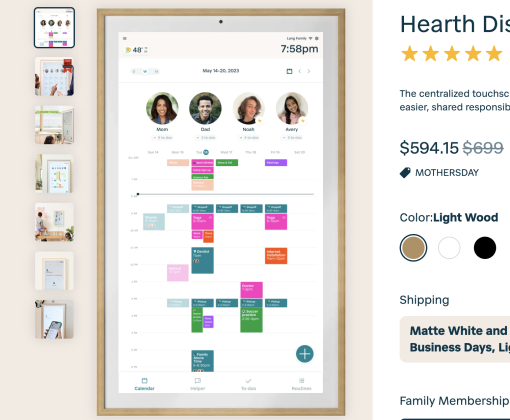
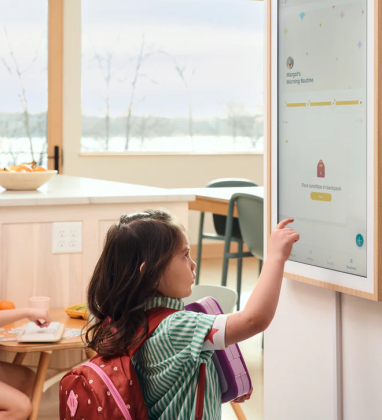
I went back and forth between the two options I was aware of (and talked ad nauseum with a friend who was considering one, as well) but ultimately chose the Hearth Display. To me, it is the prettiest option (if you are extra like me and need a calendar to look pretty), and it is big! With the Hearth, you have 30 days to decide if you like it, or you can return it. It did take a bit for me to understand exactly how all the lists work, and the different ways you can filter the lists, but basically here is how it helps me:
Merging events. My husband and I put events into either the Hearth app, on the physical Hearth calendar that hangs on the wall, or in our Apple calendars. They all merge together, and we have all events for the family synced.
Daily routines. Kids have routine lists that they can follow for the morning or afternoon. When they complete the routines, the calendar gives them a little yay message.
Grocery list. When we run out of a consumable item, everyone in the family has access to the large display to add it to the running grocery list. If it’s not on the list, it doesn’t get bought (and I have the app on my phone so the list is always with me, no forgetting it on the counter at home)!
To-do lists. For everyone and anyone you want to make one for! My husband’s honey-do list is easy to add to. If the kids need a new pair of softball pants, they just add it to my list. You can choose for the item to be a one-time job, or to be recurring (for example, I have “take a walk” on my list to do daily).
All the lists. I have lists for places or events we go to often. I have a “Softball Tournament” list, and a “Disney World” list. For a long time, I’d make a new packing list every time we’d get ready to go on a trip, which got annoying quickly (and I’d forget to add things). Now they just come over to the Hearth, tap on the appropriate list, and get started.
Meal planning. I am impatiently waiting for Hearth to add the meal plan feature (I recently saw an ad by them that says it’s coming very soon). That will be the icing on my cake, so I can stop answering the question, “What’s for dinner, Mom?” 10x every afternoon! First world problem, I know.
Weather. The weather is on the display as well, so the kids check that before getting dressed in the morning.
It’s pretty! You can choose a screensaver. I have my favorite pic of them on it, and it’s easy to change!
But — there are also a couple of cons I need to be honest about.
The upfront cost is not cheap. I bought my Hearth during their Black Friday sale, so it had a good discount on it. It was easy to set up and hang on the wall, and it does system updates automatically.
The monthly subscription. To use most of the features, there is a monthly subscription. When you buy it, a few months are included. It’s annoying, and I have no idea how much it will go up year after year, but for now, it works for our family. This subscription and what you can get with it varies between the companies.
Other than that, having a digital calendar in our home has been a great addition. Yes, it is another app to keep track of, but one that makes our house run more smoothly, and the kids can participate in it, which is always a good thing in my book.
How do you keep your family organized?